Before withdrawing your earnings from KALEOZ, sellers must complete a few steps to ensure their withdrawal account is properly set up and verified.
Please follow the steps below to get started.
1. Add Your Withdrawal Bank Account
Before submitting a withdrawal request, you must first add your bank account details to your KALEOZ Seller Portal.
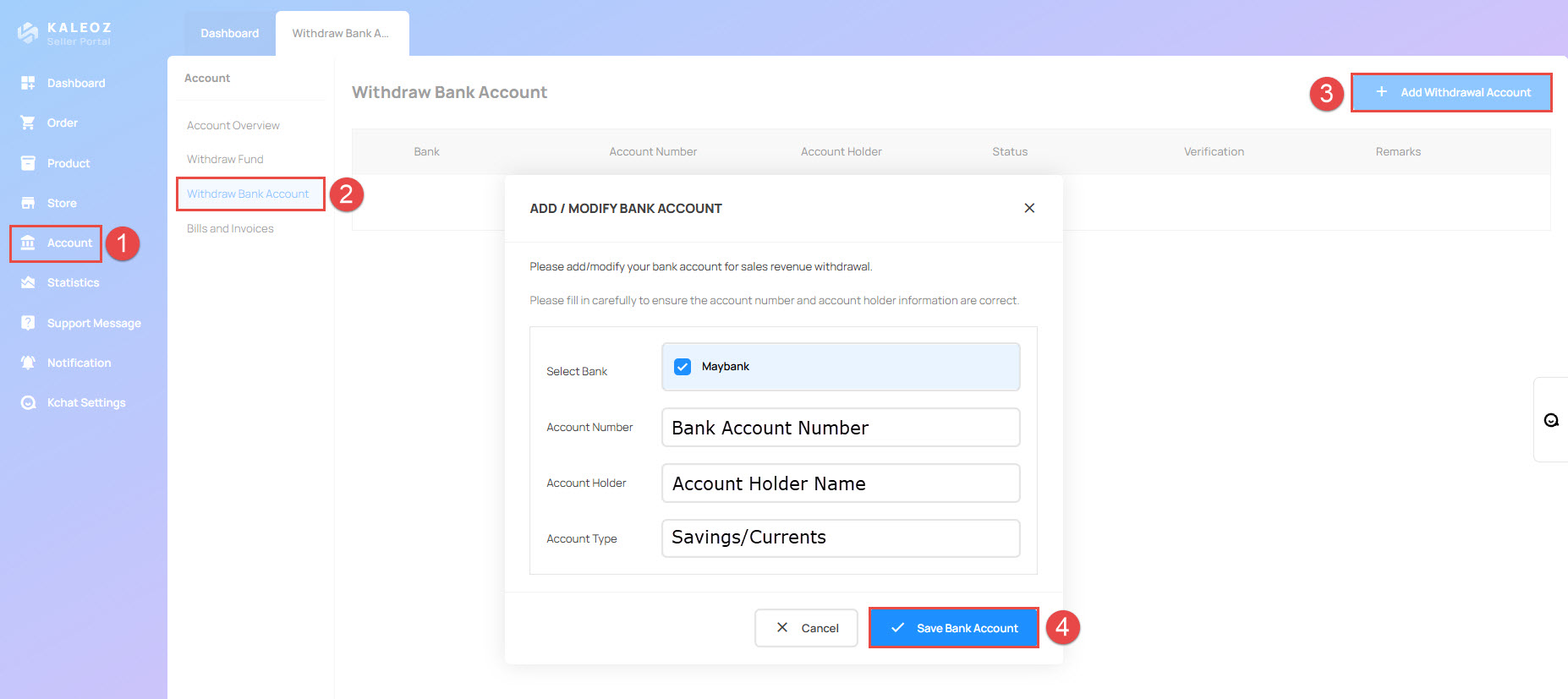
Steps to Add Your Bank Account:
- Log in to your KALEOZ Seller Portal.
- Navigate to Withdraw Bank Account.
- Click + Add Withdrawal Account.
- Enter your bank account details.
- Click Save Bank Account to complete the process.
- Ensure that your bank account number and account holder's name are entered correctly.
- The bank account holder's name must match the seller applicant's name.
- You must complete and pass the withdrawal verification (KYC) before you can withdraw your earnings.
2. Complete Withdrawal Verification (KYC)
After adding your bank account, you must complete the withdrawal verification process.
For step-by-step instructions, please refer to our guide:
3. Pass the Withdrawal Verification
Once your KYC submission has been reviewed and approved, your withdrawal verification will be marked as successful.
Please note: Withdrawal verification is a one-time process. You do not need to repeat it once it has been completed, unless further verification is requested.
4. Submit a Withdrawal Request
After successfully passing the withdrawal verification, you can submit a withdrawal request through your KALEOZ Seller Portal.
5. Wait for Withdrawal Processing
Once your withdrawal request has been submitted, please allow a few working days for processing.
- Processing time may vary depending on the withdrawal currency.
- A withdrawal handling fee will be charged when you submit a withdrawal request.
- The handling fee varies depending on the selected withdrawal currency.
For more information, please refer to our Withdrawal Fees guide.