Your avatar helps other users recognise you on KALEOZ. Whether you're a buyer or seller, you can easily upload or update your avatar by following the steps below.
A. Suitable for All Users
-
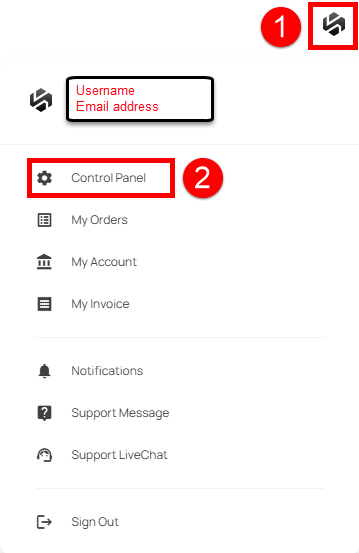
Log in to your KALEOZ account, click on your Profile Icon, and select Control Panel.
-
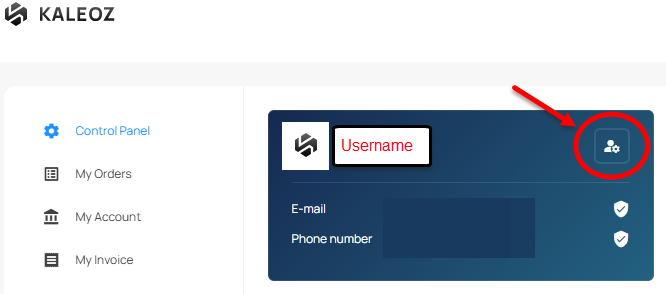
Click on Manage User Profile Icon (located next to your username).
-
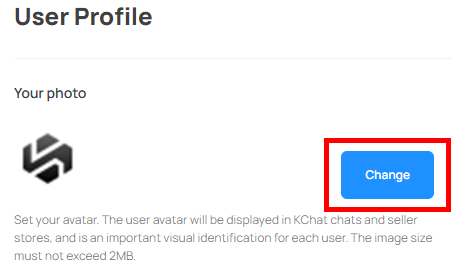
Under Your photo, click Upload/Change and select your preferred image to set or update your avatar.
B. For Sellers Only (Sellers can also upload or change their store avatar directly through the Seller Portal.)
-
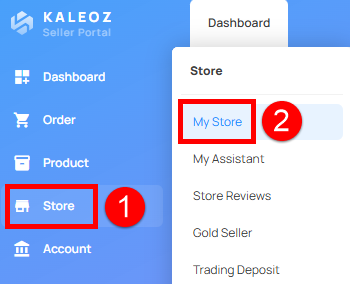
Log in to the Seller Portal, navigate to Store, and select My Store.
-
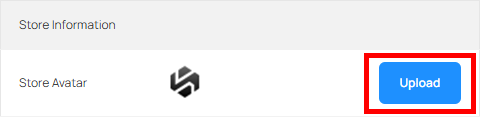
Under Store Information, locate Store Avatar and click Upload. Select your preferred image to set or update your store avatar.
Note:
▪Your avatar will be displayed in KChat conversations and Seller Stores, serving as an important visual identifier for your account.
▪The image file size must not exceed 2MB.
You're all set! Your avatar has been successfully updated.