This guide outlines the steps required to configure KChat notification settings, allowing you to receive timely alerts for incoming messages through your preferred notification channels.
Follow the steps below to configure your KChat notification settings.
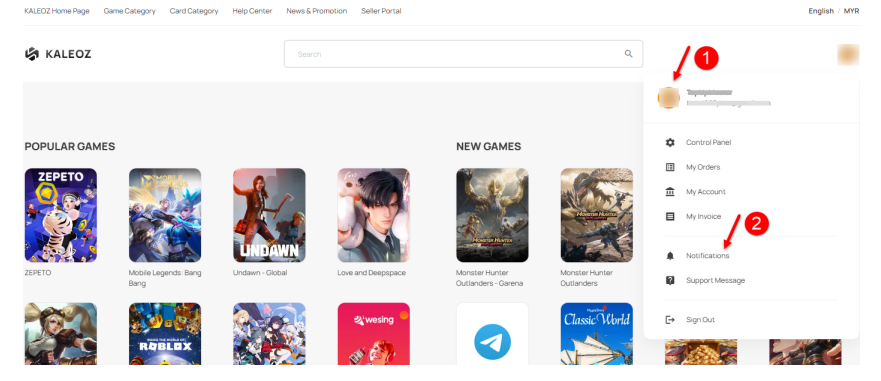
Step 1: After logging in to your Kaleoz account, click your profile icon on the homepage and select Notification.
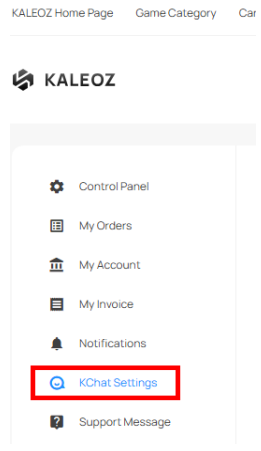
Step 2: Click KChat Settings to access the notification settings.
Step 3: Select your preferred notification options under Message Notification and/or Offline Notification, then click the corresponding Save Settings button to save your changes.
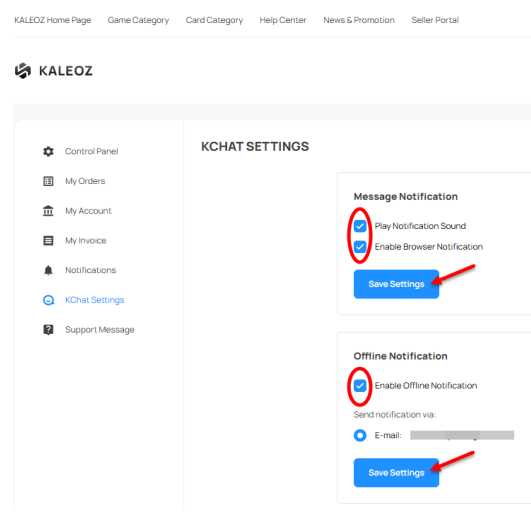
Play Notification Sound: Enable this option to hear a sound when new KChat messages arrive.
Enable Browser Notification: Enable this option to receive pop-up notifications on your screen when new KChat messages arrive.
Enable Offline Notification: Enable this option to receive email or SMS notifications when new KChat messages arrive while you are offline.