To withdraw your earnings, you must first complete the
Withdrawal Verification (Know-Your-Customer, or KYC) process.
Step 1: Access Withdrawal Verification
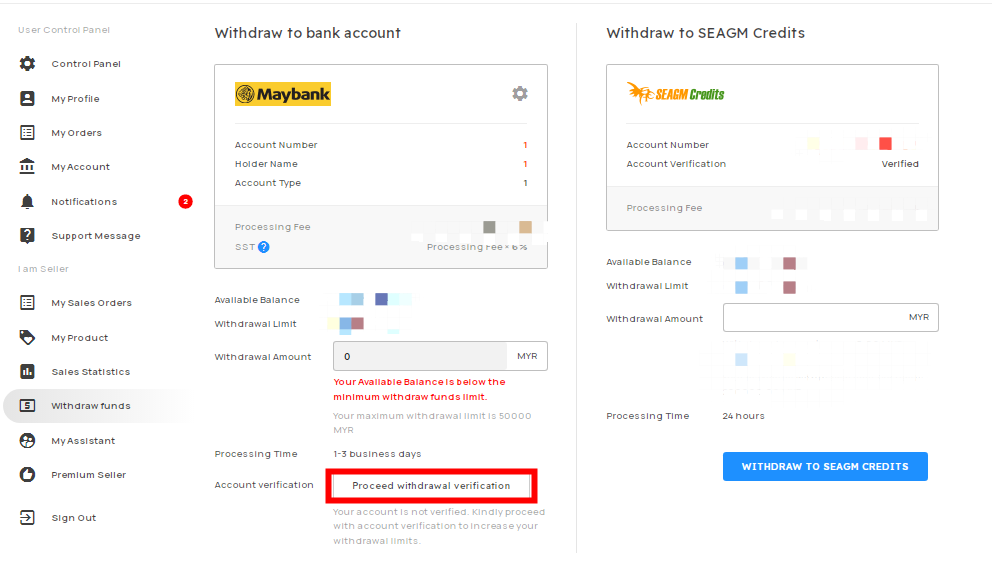
- Hover over your KALEOZ account name.
- Click "Withdraw funds" .
- Click "Proceed withdrawal verification".
Step 2: Upload Your Identity Verification Photo
Upload a clear selfie of yourself holding a valid:
- ID Card
- Passport
- Driving License

The document must clearly show your full name.
Note:
You may use the same photo that was submitted during seller verification.
Step 3: Upload Your Bank Account Verification Document
Upload a screenshot or photo of your bank statement or internet banking page that clearly displays:
- Your full name
- Your bank account number

Important:
The bank account holder's name must match the seller applicant's
name exactly.
Step 4: Submit Your Verification
Once both documents have been uploaded, click "Submit Withdrawal Account Verification".

If you have not completed phone verification, please do so before submitting your application.
Processing Time
Your withdrawal verification application will be reviewed
and processed within 24 hours.
Required Documents Summary
- Selfie holding your ID Card, Passport, or Driving License
- Bank statement or internet banking screenshot showing your full name and bank account number