Note:
1. A processing fee is automatically applied at checkout. The applicable fee may vary and is subject to change without prior notice.
2. PayNow (SGD) is only available when Singapore Dollar (SGD) is selected as the payment currency for the Singapore region.
3. Ensure that your Virtual Private Network (VPN) is disabled before proceeding with checkout.
Step 1: Select your products on KALEOZ, then click "PayNow" to proceed to the checkout page.
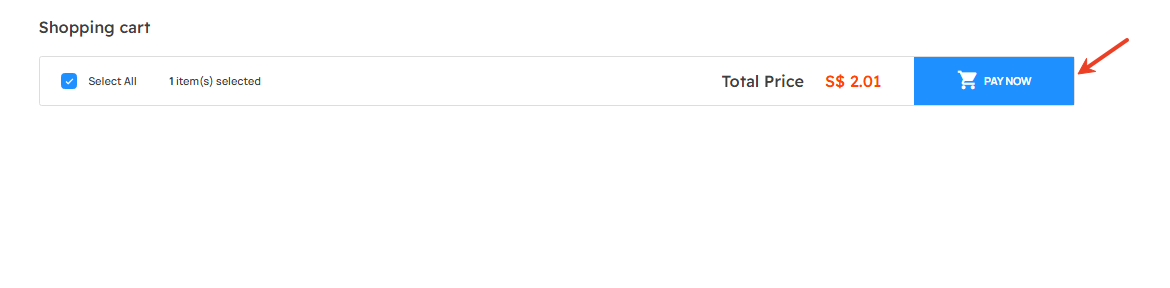
Step 2: Select PayNow as your payment method, then click "Create Payment."
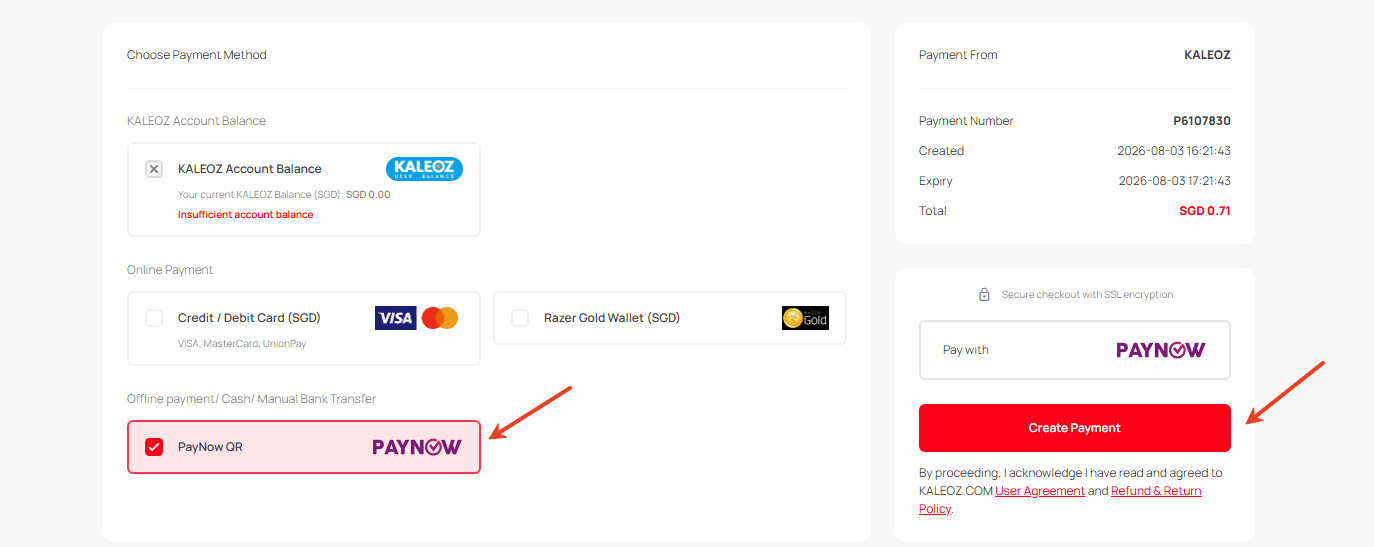
Step 3: You will be redirected to the Tazapay PayNow payment page.
Step 4: Follow the on-screen instructions to complete your payment. After the transaction is successful, wait for the payment gateway to automatically redirect you back to our website to finalize your order.
Note: Please allow the website to fully load after the payment is completed. Closing the page or interrupting the redirect may result in a pending (floating) order.
Step 5: Once your payment is complete, you can view the order status under My Orders page.
Thank you.
If you have any questions, please contact our Customer Support team.